
Radio Script Writer
Help us improve by giving feedback on the output!
Thank you for your feedback!
And Share it if you loved it!
Share via
Liked the output? Join the AI Enthusiasts WhatsApp Community.
Join NowWhen you need to craft tailored, engaging radio scripts, the Radio Script Writer generator is here to simplify the process. This tool helps you write everything from advertisements to talk shows, fitting the style you need. It takes specific inputs and turns them into an original script that sounds professional and is ready for the airwaves.
Getting started with the Radio Script Writer is straightforward. Here’s a step-by-step guide on how to use it effectively:
- Select the genre: Choose from various options like Advertisement, Comedy, Drama, or Talk Show to set the right tone for your script.
- Define your target audience: Indicate whether you’re aiming for General Public, Young Adults, or College Students, among others. This helps tailor your message.
- Input the topic or theme: Clearly define what the script will focus on, such as “Promoting a new smartphone.” This is crucial for keeping the content aligned.
- Choose the script length: Select how long you want the script to be, with options ranging from one minute to an hour.
- Decide on the tone: Indicate your desired tone, whether it’s Serious, Funny, or Light-hearted. This will impact how the content is conveyed.
- Specify the setting: Optionally, you can provide a location for the script, such as “A busy tech expo,” to enrich the context.
Once you’ve filled in these input fields, the generator will produce an engaging radio script that meets your specifications. You can expect structured content complete with timing, voice direction, and audio cues, making your radio production smooth and efficient.
Let’s get into what the generator is all about, exploring its functions and the technology behind it.
Contents
ToggleWhat is a Radio Script Writer?
A radio script writer is an AI-powered tool that creates engaging scripts for radio broadcasts, including commercials, shows, and public service announcements. It generates complete scripts with proper timing, voice direction cues, and audio effect notations tailored to your specific needs. This tool helps you craft professional radio content without needing extensive script writing experience.
The generator works by analyzing your inputs about genre, target audience, topic, and desired tone to produce scripts that follow standard radio script frameworks. It automatically includes timing markers, sound effect cues, and voice direction notes that make the script production-ready. You can create anything from a quick 1-minute advertisement to a full 30-minute drama segment, with the tool adapting to different formats like ad scripts or podcast scripts.
Radio remains a powerful medium with significant audience reach and advertising value, making quality script writing essential for effective broadcasting. The tool handles the technical aspects of radio formatting while ensuring the content connects with listeners through clear, conversational language that works without visual support. This approach helps overcome common radio writing challenges while maintaining the engaging quality that keeps audiences tuned in.
How to Write a Radio Script Using GenerateStory’s Radio Script Writer?
Using the radio script writer involves providing specific details about your project through a straightforward input form. The tool takes your requirements and transforms them into a complete, formatted radio script ready for production. You start by selecting basic parameters that define your script’s structure and purpose.
Step 1: Setting Your Script’s Foundation
Begin by choosing your script’s genre from options like advertisement, comedy, drama, or news. This determines the overall style and approach the AI will take. Next, select your target audience—whether it’s general public, professionals, or young adults—as this shapes the language and content. You then enter the specific topic or theme, like “promoting eco-friendly products” or “discussing local news events.”
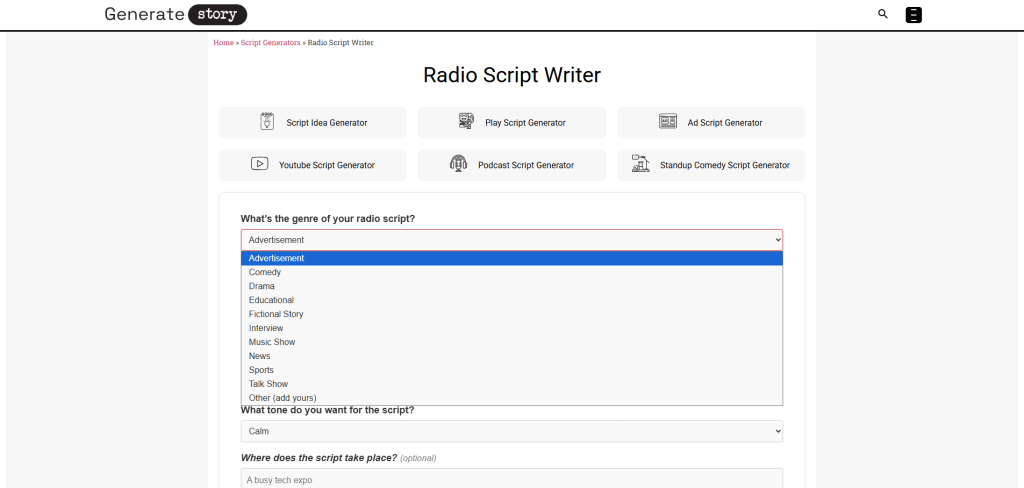
Step 2: Defining Your Audience and Purpose
You identify your target audience, whether it’s general public, professionals, or young adults. This ensures the language and content resonate with the right listeners. You then specify the main topic or theme, like promoting a new product or discussing current events. The tool uses this information to craft messaging that aligns with your goals while considering that radio writing requires clear, simple language for audio-only comprehension.

Step 3: Defining Technical Specifications
Choose your script length from options ranging from 1 minute to 1 hour, which controls the amount of content generated. Select the tone you want, such as serious, funny, or promotional, to guide the writing style. Optionally, you can specify the setting where the action takes place, like “a morning talk show studio” or “a busy city street,” which helps create more contextual dialogue.

Step 4: Refining the Details
The generated script comes formatted with clear scene headings, character labels, and audio cues. You get a complete document that includes all spoken parts with timing notations. The script indicates where sound effects or music should occur and provides voice direction notes. You can use this output directly for recording or refine it further using other tools like our script improver for polishing. But if you want some improvisations in the script, you can alter the inputs given and make necessary changes, and regenerate the script.

Step 5: Generating the Complete Script
The AI processes all inputs to create a formatted script with proper timing markers, voice direction cues, and sound effect notations. It follows industry standards for radio script formatting, ensuring the output is production-ready. The tool incorporates effective sound effect usage principles to enhance the audio experience without overwhelming the narrative.
Step 6: Adapting for Different Formats
The same input process works for various radio formats, from short commercials to longer dramatic pieces. The AI adjusts its approach based on your chosen genre and length parameters. For advertisement scripts, it focuses on persuasive language and clear calls to action. For dramatic pieces, it builds character development and narrative tension. The tool maintains appropriate language complexity based on your target audience selection.
Why Use GenerateStory’s Radio Script Writer?
Let’s talk about why you’d want to use a radio script writer in your creative workflow. Radio might seem like an old-school medium, but it actually reaches more people than you might think, with broadcast radio remaining the leading mass media for audience reach. That means there’s still a real need for quality scripts that connect with listeners through sound alone.
Overcoming Radio’s Unique Writing Challenges
Writing for radio presents specific hurdles that don’t exist in visual media. You have to convey everything through dialogue, sound effects, and tone of voice without any visual support. The tool helps you navigate these challenges by automatically incorporating clear audio cues and natural dialogue patterns. It avoids dense language and complex sentence structures that can lose listeners, which is one of the common struggles in radio writing. This approach ensures your message comes through clearly the first time someone hears it.
Saving Time on Technical Formatting
Radio scripts require specific formatting with timing notations, sound effect markers, and voice direction notes. Manually adding these elements can eat up valuable writing time. The generator handles all the technical formatting automatically, giving you more time to focus on your content’s creative aspects. It calculates approximate timings based on your selected duration and includes appropriate pauses for dramatic effect or breathing room.
Adapting Content for Different Audiences
The same message needs to be delivered differently depending on who’s listening. A script for children requires simpler language and more energetic delivery than one targeting professionals. The tool adjusts vocabulary, sentence structure, and pacing based on your selected audience demographic. This tailoring helps ensure your content resonates with the right people and maintains their engagement throughout the broadcast.
Maintaining Consistent Tone and Style
Keeping a consistent tone across an entire script—especially longer formats—can be challenging when writing manually. The generator maintains your chosen tone throughout the script, whether you need something serious and authoritative or light-hearted and conversational. This consistency helps build trust with listeners and reinforces your message’s impact without awkward tonal shifts that can disrupt the listening experience.
Generating Production-Ready Material
You get a complete script that’s ready for voice actors and sound engineers to work with immediately. The output includes all necessary technical notations that production teams expect to see in professional radio scripts. This eliminates back-and-forth revisions and clarification requests, speeding up your overall production timeline. The scripts work seamlessly with other audio production tools and processes.
Experimenting with Different Formats
Maybe you usually write advertisements but want to try creating a dramatic piece or educational content. The generator lets you experiment with different radio formats without investing hours in research and trial writing. You can quickly generate samples in various genres to see what works best for your message or audience. This flexibility is valuable when you’re developing new content strategies or exploring creative directions.
Frequently Asked Questions
How does the Radio Script Writer handle different script lengths?
The Radio Script Writer calculates word count and pacing based on your selected duration. For a 1-minute commercial, it generates concise, impactful dialogue with tight timing. For longer 30-minute dramas, it includes natural pauses, scene transitions, and character development moments while maintaining proper timing notations throughout the script.
Can the Radio Script Writer create scripts for specific radio formats like talk shows or dramas?
Yes, the Radio Script Writer adapts to various formats through its genre selection. For talk shows, it generates conversational dialogue with host-guest interactions. For dramas, it builds narrative tension with character development and sound effect cues. The tool follows format-specific conventions while maintaining radio-appropriate language and pacing.
Does the Radio Script Writer include sound effects and voice direction notes?
The Radio Script Writer automatically incorporates professional audio production elements. It adds sound effect cues like [SFX: door creaking] and voice direction notes such as [VOICE: excited, upbeat] based on your selected genre and tone. These notations follow radio production standards and help voice actors and sound engineers understand the intended delivery.
How does the target audience selection affect the generated script?
The Radio Script Writer adjusts language complexity, content approach, and pacing based on your audience choice. For children's programming, it uses simpler vocabulary and more energetic delivery cues. For professional audiences, it employs industry-specific terminology and a more measured pace. This tailoring ensures the content resonates with your specific listener demographic.
Can I use the Radio Script Writer for commercial advertising scripts?
The Radio Script Writer excels at creating commercial scripts with persuasive language and clear calls to action. When you select "advertisement" as your genre, it focuses on benefits-driven messaging, brand positioning, and customer engagement strategies. The tool includes appropriate timing for product mentions and ensures compliance with standard radio ad length requirements.

A Ph.D. in English Literature from UMass Amherst with over 8 years of academic research experience, Ruth founded GenerateStory.io to bridge traditional story writing with AI-powered storytelling tools. She specializes in helping writers create compelling stories by combining her expertise in literary analysis with innovative technology solutions.
